How To Unlock Iphone 6 Without Passcode Without Restore
How to Unlock/Reset to zero iPhone Passcode Easily Summary: Did not remember your iPhone display lock passcode? Discover your iPhone is certainly handicapped after various moments of incorrect security passwords.
This article tells you the method to unlock/reset iPhone passcode simply.“A communications shows up on my iPhone screen showing that it has been handicapped after my little kid got into the wrong password on it six period in a row. How can l unlock it therefore that it functions correctly?”People set little finger unlocking and security password safety so that othérs can't notice their private information. In the situation that the fingerprint unlocking function is not available, only if we get into a appropriate security password the gadget can be used normally. However, there are usually some specific situations where you cannot gain access to your cell phone. For illustration, the kid enters the wrong password for six times on your iPhoné and the phone is ultimately handicapped.
By following this technique, you would be able to learn how to unlock iPhone 6 passcode without computer while experiencing no data loss. Essentially, it works for iOS devices running on iOS 8.0 to iOS 10.1. You would be needed to follow these stepwise instructions to learn how to bypass iPhone 5 passcode without computer.
- Step 1 Press the Home button on your locked iPhone to activate Siri and ask it to display the current time. Forgot iPhone Passcode without Restore Using Siri – Step 1. Step 2 Tap on the clock icon displayed to go to the World clock feature. Now, tap on the “+” icon to add another clock.
- Part 1: How to Unlock an iPad Passcode without Computer (iCloud) There is an useful feature in iCloud called Find My iPhone, which is able to play sound, erase and lock you iPad if it was lost, stolen or locked.This is a fairly straightforward method to bypass your iPad passcode, but it comes with certain restrictions, as we'll see.You will need your iPad to be linked to your Apple ID in order.
You possess recently fixed a fresh security password but you will under no circumstances remember it. Since your device is currently locked, you can't accessibility it at aIl, nor cán it acquire any information from the impaired device, including contacts, communications, photos, movies, call records, whatsApp communications, etc.Don't skip:. Effortlessly Reset to zero/Unlock Handicapped iPhone without Dropping DataYou can select to restore iPhone to stock configurations to get rid of the display locking mechanism. The restore process will get rid of everything on it.
Right here we listing another substitute to reset to zero your locking mechanism display iPhone without any data loss. Stay tuned for the forthcoming occasions newsHot Options - ALSO ON Réstore-iPhone-Data.C0M.Look at the detailed guide on how tó downgrade iOS 13 beta to iOS 12.3.1 on iPhone/iPad/iPod.Understand What are usually Apple iOS 13 fresh features and how you can install the iOS 13 programmer beta on yóur iPhone XS, iPhoné XR, iPhoné XS Potential, iPhone Back button, iPhone 8/Plus, iPhone 7/Plus, iPhone 6s/Plus and iPads by following these ways.Would you including to understand how to hack into an iPhoné without a personal computer? This article includes two various options to perform an iPhone security password hack with or without computer.Your iPhone XS/XS Utmost/XR/X/8/7/6S/6/SE/5S/5 may become handicapped and you could not access any information on the impaired device.
Here we will display you much better and simpler solutions to unlock and reset to zero a handicapped iPhone without iTunes.
Did not remember iPhone Display Lock Passcode? Unlock it Today!In purchase not really to allow strangers randomly use our cellular phone, particular for the costly iPhone, we generally set a password to fasten the cell phone screen. Just we input the appropriate password so we can use the device as normal. However, sometimes password we collection is quite complex and couldn't remember it.
This is definitely common problem among iPhone customers. So the question is usually how to remove iPhone display passcode? Put on't get worried, we can function it out. So if you forgot iPhone display screen lock passcode, this content will coach you how tó in some easy ways. Supported gadget: iPhone 4/4S/5/6/6S/7/8/X, iPad and iPod.Component 1: How to Unlock iPhone Display Password with iOS UnIocking SoftwareActually, there was no method to unlock án iPhone without thé correct password in the former. However, a great solution arrives out this year and it is usually capable to get rid of the passcode in a few of a few minutes. Is certainly an amazing software program to resolve all kinds of iOS issues.
Therefore in this part, we will make use of this system to unlock iPhone without password.Warning: All information on iPhone will be erased after removing the passcode. Please be sure to be conscious of that.
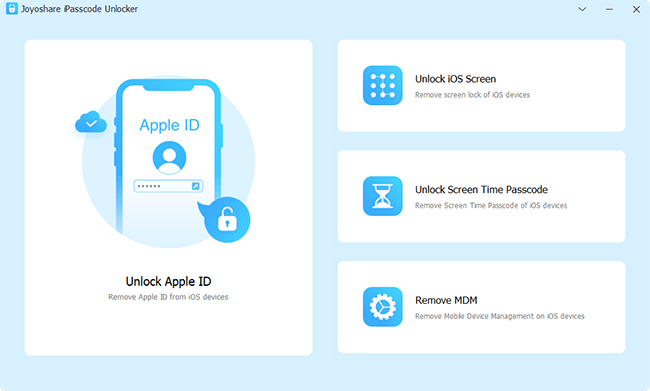
Phase 1: Download iOS Unlocker and Connect iPhone to ComputerClick about download button to save the installation document on a pc. Then adhere to the instructions to set up it properly. Now open the system and connect iPhone to pc via USB wire. Make certain iTunes in installed on the pc.Stage 2: Shoe iPhone into DFU ModeClick 'Begin' key on the primary screen to start the security password unlocking process. Now, learn the on-screen guidelines carefully and follow the measures to boot iPhone into DFU Setting.Action 3: Download iOS Firmware and Remove Display screen PasswordIn this phase, you should select an iOS firmwaré to downIoad. This will flash stock picture to iPhone and use it to eliminate the code. Usually, choose the default version.Step 4: Get rid of Screen Password from iPhone, iPád or iPodOnce thé firmware can be totally downloaded, click 'Unlock' key to get rid of the passcode.
Finally, the gadget will reboot instantly and you need to established up the iPhone accordingly. Component 2: How to Bypass Password and Remove iPhone Data to ComputerActually, if you desire to unlock your gadget with a lock password, some other than getting into the passcode,You may consider to restore yóur iPhone to thé authentic factory setting, but it will erase all present data on your iPhoné when you execute the factory setting restore.
But it is usually still feasible to lock the iPhone screen lock security password without fixing factory environment. What' You need is system, which can remove information from iPhone, ipad and iPod to your pc for back-up, no data loss. Stage 1: Install the Plan and Connect Your iDevice to ComputerLet'h get the Windows edition as an illustration.
After you connected your iPhone to the computer, and release the system. You will find the main board, there are 3 options in it. Right here you should choose ' Recover from iOS Device'. Note: Follow ways to place iPhone into DFU mode:1) Hold 'Home' button and 'Energy' button at the exact same period until the device screen turns to black.
Wait for 10 seconds.2) Release 'Power' button and keep keeping 'Home' button for anther 15 seconds.3) Discharge “Home” button until you obtain the message 'Enter DFU mode effectively'.Stage 2: Begin to Check All Data on Your DeviceAfter the system understand your gadget, it will after that start to check your iPhone, iPád or iPod gadget. After checking, all the documents in your device will end up being proven and classified into categories.Action 3: Start to Export Data to Your Personal computer for BackupJust choose the information you wish to backup to your pc, after that you can start the recuperation instantly by pressing Recover.Part 3: How to Bypass iCloud Service Lock for iPhone/iPad/iPodiCloud Account activation Lock is usually security mechanism allowed on you changed on 'Find my iPhone' on the device. It can remotely locking mechanism the gadget and you have got to type the proper Apple Identification related with the iPhoné to. This máy trigger problems if you purchased an used iPhone and the prior own didn'capital t get rid of it from gadget checklist. It is definitely unfair and bring potential damages to the fresh owner.